


Microsoft Services
We take care of your core Microsoft environments – Active Directory, Entra ID, DNS/DHCP, Exchange and servers – with design, hardening and ongoing management.
We take care of your core Microsoft environments – Active Directory, Entra ID, DNS/DHCP, Exchange and servers – with design, hardening and ongoing management. You get a stable identity and infrastructure foundation the rest of your IT can rely on.
Microsoft’s core infrastructure services remain a backbone of modern IT environments. Active Directory (AD), for example, has been a foundational component of enterprise IT since 2000 and continues to provide reliable identity management decades later. It is still the directory that most on-premises estates authenticate against. Likewise, critical network services such as DNS and DHCP remain indispensable, as they underpin authentication, resource access, application availability, and network performance. Even as cloud-native solutions grow, these services remain the basis for stability, security and interoperability across on-premises and hybrid environments.
Many organisations, especially in regulated sectors such as finance, healthcare and government, keep Microsoft servers on site to hold the data and the configuration under their own control. Others leverage cloud services or hybrid models, but all share the need for core Microsoft infrastructure to be stable, secure, and well-integrated. These services (whether on physical servers or in the cloud) form the foundation for identity, security, and network management in an organisation’s IT ecosystem. In every case it is the configuration, and the support around it, that keeps the environment predictable.
In brief
- Who
- Organisations with Microsoft-based infrastructure on-premises, hybrid or in the cloud that need a stable and secure identity and infrastructure foundation
- What
- Active Directory and Entra ID, DNS and DHCP, file and print services, PKI and certificates, NPS/RADIUS, Exchange Server, integration with Microsoft 365 and GPO management
- How
- Design, hardening and ongoing management according to Microsoft best practice, least privilege and delegated administration, documentation and knowledge transfer
Our Microsoft Infrastructure Services
Kristensson i Skåne AB offers end-to-end expertise to help you implement, manage and optimise the whole range of Microsoft infrastructure components. Our services cover the building blocks — from on-premises server roles to cloud directory services — and see that they work together. We help with new implementations, ongoing support, security hardening and optimisation of the environment. The central service areas are these.
- Active Directory (AD & Microsoft Entra ID)
We design, deploy and support Active Directory Domain Services on-premises as well as cloud-based Microsoft Entra ID for modern identity management. That covers setting up new AD forests and domains, restructuring or consolidating existing directories, and configuring trust relationships. We handle the whole AD lifecycle: standing up new domain controllers, migrating or retiring older ones, and keeping replication healthy and backed up.
Given the critical role AD plays — users, devices, credentials, policies — we put weight on security hardening and established practice. A compromised AD hands an attacker the keys to the kingdom in practice, so we implement controls that make that harder. We also enable hybrid identity by integrating on-premises AD with Microsoft Entra ID, so authentication extends to cloud applications. From tiered administration to monitoring AD health, we work to keep your directory a reliable and secure backbone for the IT environment. - DNS and DHCP
We configure and troubleshoot DNS and DHCP to Microsoft’s established practice. A correct DNS and DHCP design is decisive for the whole network — name resolution, IP address management and device connectivity. Our consultants set up stable DNS zones and forwarding, establish DHCP scopes with the right exclusions and reservations, and build in redundancy so clients still get an address if one server is unavailable. We also help with hardening, protection against cache poisoning and safer scope handling for instance, and with AD-integrated DNS. These are the services authentication and access rest on, so we configure them for resilience and performance. - File and print services
We help organisations set up and manage Windows file servers and print servers for secure resource sharing. We design a file sharing strategy that balances easy access with strict permission control: folder structure, NTFS permissions and AD group-based access, so access follows the group model rather than ad hoc shares. We advise on storage strategy — when DFS is appropriate, or drive mapping through GPO — and see that data is protected, through Volume Shadow Copy, backup and encryption at rest where it is needed. For printing we configure stable print servers, printer pools and technologies such as Print Management or Universal Print. We can also help migrate file and print to the cloud or to a more modern platform — SharePoint, OneDrive or Azure Files — while keeping interoperability. - PKI and certificates (Public Key Infrastructure)
We offer specialised support for certificate services. We can design and deploy a PKI hierarchy on AD Certificate Services (AD CS), an offline root CA with one or more subordinate CAs, or integrate certificate-based authentication with Microsoft Entra ID, depending on your needs. A well-implemented PKI is critical because it carries trust in the network — strong authentication, encryption and digital signatures. We set up certificate templates, auto-enrolment and a secure certificate lifecycle with renewal and revocation through CRL or OCSP. We also integrate certificates into the use cases that need them: TLS for internal services, smart card and certificate sign-in, secured Wi-Fi (802.1X), VPN and code signing. And we help operate the PKI safely: protecting private keys with an HSM or an offline root, separating roles, and documenting the processes. The result is that you can issue and manage certificates with high assurance. - Network Policy Server (NPS) – RADIUS
We help you implement Network Policy Server, Microsoft’s RADIUS server and proxy for network authentication. NPS gives central control of network access policy — authentication and authorisation for Wi-Fi (802.1X), VPN or port-based access control. We install and configure NPS, define the RADIUS clients such as WLAN controllers and VPN devices, and set the policies for who may connect and on what conditions. NPS integrates closely with AD, and we can configure certificate-based authentication (EAP-TLS) with certificates from your PKI, a RADIUS proxy where needed, and high availability. Configured properly, NPS gives you secure and central control of network access, which matters for zero trust and for compliance. The network itself, with firewalls, switches, wireless and VPN, is handled under network services. - Exchange Server (on-premises and hybrid)
We support the full lifecycle of Microsoft Exchange Server on-premises, including the current on-premises version. Our services cover architecture and sizing, installation and upgrades, migration projects, and operation of mail flow, databases and high availability (DAG). We also help harden Exchange through configuration, patching routines and monitoring. For hybrid scenarios we design and maintain secure integration with Microsoft 365 and Exchange Online for staged migration, hybrid routing and identity alignment. - Microsoft 365 integration and GPO management
We help you connect on-premises infrastructure with Microsoft 365 for one coherent hybrid environment. That often means setting up and tuning Microsoft Entra Connect to synchronise accounts and enable SSO to the Microsoft 365 apps — Exchange Online, Teams, SharePoint and the rest. We set up identity federation or synchronisation with security and reliability as the design goal. We also implement Microsoft’s security baselines and Group Policy Objects (GPOs) for consistent settings on Windows devices: password policy, hardening, software rules and Office settings in line with the recommended baselines. If you use Intune in a hybrid setup we help there too, with compliance policies and configuration profiles. In short, we cover the glue that holds the Microsoft ecosystem together — from GPO to cloud policy — with security in each layer.
Deployment Models: On-Premises, Hybrid, or Cloud
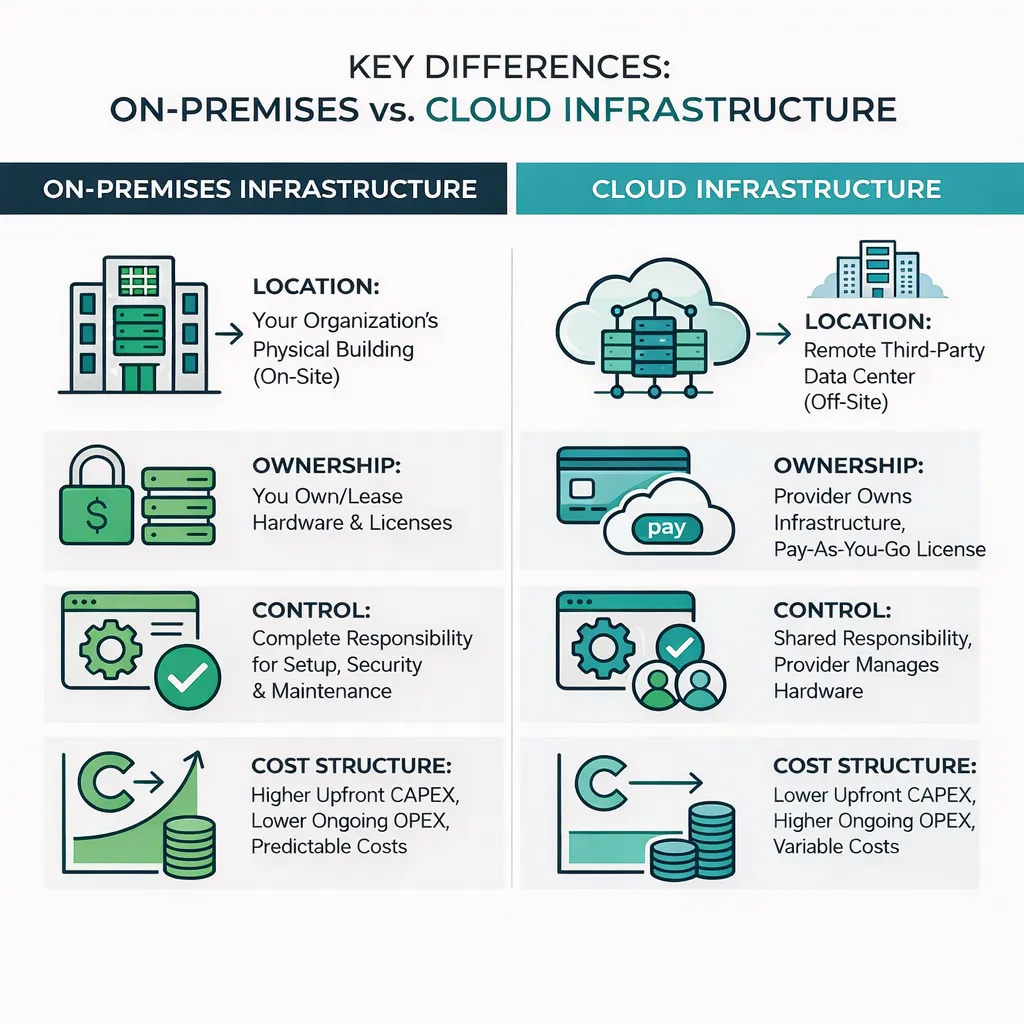
On-premises means full ownership and direct control of hardware, software and data — you manage everything locally — while cloud infrastructure moves many responsibilities to a provider and gives more flexibility in scaling. Kristensson helps you navigate these models and choose the one that fits: keeping everything in-house, going fully to the cloud, or a balanced hybrid. We have worked with all three and can support a transition, an on-premises to cloud migration for instance, or optimise the setup you have.
- On-premises
We support classic on-premises Microsoft environments where the services run in your own data centre or server room. The model is often chosen by organisations that need tight control over data and systems, which is common in regulated sectors. We architect and manage domain controllers, file servers and the like. We build site topologies for multiple offices, configure backup and DR for critical servers, and design high availability where it is needed, with multiple domain controllers and failover clustering. On-premises does not mean dated — we help you use the current Windows Server capabilities while meeting air-gap and compliance requirements. If you later want to add cloud services, the foundation is ready. - Hybrid (on-premises and cloud)
Many organisations choose hybrid, where on-premises is complemented by cloud services. Kristensson specialises in hybrid architecture. We connect on-premises AD to Microsoft Entra ID, set up Microsoft Entra Connect or federation (AD FS), and configure conditional access in both environments. You can keep AD, file and print local while using Exchange Online or Azure Files, and we handle the integration and the data flow between the two worlds. We also help with hybrid device management, Microsoft Entra hybrid join and co-management with Intune and SCCM. Hybrid often gives the best of both: a proven on-premises base with the scalability and the modern capabilities of the cloud. We design with security in front — synchronising only the identity data that is needed, MFA for cloud apps — and build something that can develop over time. - Cloud-only
For cloud-first organisations we help you get the most out of cloud-native Microsoft services without any on-premises servers. We help with Microsoft Entra ID as the primary directory and, where legacy needs it, Microsoft Entra Domain Services. We configure Microsoft 365 — Exchange Online, SharePoint Online and the rest — to established security practice from the start. We establish cloud governance: Microsoft Entra roles, conditional access, Intune compliance policies and integration with third-party apps. Cloud-only still needs a considered setup: tenant structure, groups, naming conventions, and tooling such as Microsoft Defender for Cloud Apps to monitor SaaS use. We can also migrate data and applications from on-premises to Azure and Microsoft 365 in planned steps, with verification that the data arrived intact. The result is an efficient cloud infrastructure that still meets your requirements on security and operation.
Whichever model applies, we follow Microsoft’s established practice for configuration and security. Even if fully on-premises estates shrink over time, hybrid architecture is likely to stay common for a long while — AD supports legacy applications and internal systems while the cloud carries the modern workloads. We design with that in mind, so you can shift between on-premises and cloud as the business develops.
Security, Compliance & Best Practices
Trust and security are central to everything we deliver. Kristensson i Skåne AB works so that your Microsoft infrastructure not only functions but is hardened and compliant. Our approach includes these.
- Security hardening and baseline configuration
We secure each service against established guidance, Microsoft’s own security baselines and the CIS Benchmarks among them. We close the default weaknesses and reduce the attack surface from day one: LDAPS, strong authentication policies, and retiring legacy protocols where that is possible. We standardise the settings — encryption, logging, firewall rules — for a consistent security level. Hardening also covers registry and file permissions, removing or isolating unnecessary services, and secure-by-default configuration. - Least privilege administration
We implement least privilege through RBAC and delegated administration, so users and administrators hold only the rights they need and no more Domain Admin than necessary. That can mean tiered administration, separate admin accounts, just-in-time access with a PAM tool, RBAC in Azure and fine-grained delegation in AD. We separate duties where we can — backup operators, auditors and domain administrators apart — which limits the damage if an account is compromised. The result is a tightly controlled environment with good traceability and lower insider risk. - Documentation and knowledge transfer
We deliver documentation after an implementation or a change: network diagrams, the AD design with sites, OUs and GPO links, service accounts and permissions, certificate processes. That helps operations, and it is equally valuable in an audit or a regulatory review. We also train your team in the key areas — certificates, AD recovery, DNS management — so you can manage the environment with confidence. Where it is useful we map the deliverables to control requirements in ISO 27001, the GDPR and NIS2. - Ongoing updates and support
Security is not a one-off effort. We help you establish a solid management routine: patching Windows Server and applications, planning and testing updates, health checks and monitoring so problems surface early — replication, disk, unusual sign-ins. The support can be anything from periodic reviews and AD security audits to a fully managed service. We work proactively: clearing stale accounts, keeping documentation current, and making the iterative improvements that keep the infrastructure secure and stable.
Following these security measures and this practice, we design your Microsoft infrastructure for today’s needs with tomorrow’s threats in mind.
Common Use Cases
Over the years we have helped many customers with Microsoft infrastructure. Here are some common scenarios and how we help.
- New environment (greenfield)
Building a new environment from scratch — a startup, a new office, a spin-off — can be demanding. We help with the greenfield work: a new AD domain or Microsoft Entra tenant, DNS naming, the initial servers and the security baselines from day one. That gives a solid foundation with the right architecture and governance, rather than shortcuts that cost later. - Domain migration or redesign
Many organisations have older AD environments that have become untidy, or several domains and forests after a merger. We plan and carry out migrations and consolidations with minimal impact: migrating accounts, groups, clients and servers, and modernising OU structure, GPOs and delegation. We can also handle Windows Server version upgrades, schema updates, new domain controllers and the controlled retirement of the old ones. The result is a modern directory that is easier to manage, more secure and ready for what comes next. - Security uplift and hardening
After an incident, a penetration test or an audit we can run a targeted security uplift: an AD security assessment and the measures that follow — MFA, a stricter password policy, clearing up privileges, patching domain controllers and servers, and fixing misconfigurations. We can also scan for signs of intrusion and implement the recommended controls, LAPS, Protected Users and improved AD auditing among them. The result is an environment that is more tightly configured and better monitored. - Compliance and audit preparation
We help map technical settings to ISO 27001, PCI-DSS, the GDPR and NIS2. Showing that only authorised people reach a file share, that administrative actions are logged and reviewed, and that the policies meet the complexity requirements. We produce the basis and the evidence — network diagrams, lists of privileges, GPO reports — and close the gaps quickly. You end up with an environment where you can demonstrate control, traceability and compliance, and which is more secure and better run for it.
Effective management of Microsoft infrastructure can dramatically improve an organisation’s security and efficiency. Whether you need a fresh set of eyes on your AD and network setup, or ongoing expertise to support your team, we’re here to help. Contact Kristensson i Skåne AB to schedule a comprehensive Microsoft environment assessment or to discuss how our experts can assist you. We’ll evaluate your current setup, identify opportunities for optimisation or risk reduction, and partner with you to ensure your core Microsoft services, on-premises, in the cloud, or both are stable, secure, and aligned with your business goals.
Want to know what it would look like for you? Contact us and we will tell you more. Read more about how we work and about Microsoft 365.
Frequently asked questions
Should we keep Active Directory on-premises or move to Entra ID?
It depends on your applications, requirements and maturity. Many organisations run hybrid for a long time: Active Directory for legacy applications and internal systems, Entra ID for modern cloud services. We help you choose a model and build a secure transition at the pace the business can handle.
Do you help with Active Directory hardening after an incident or a penetration test?
Yes. We carry out targeted security uplifts: review of privileged accounts and groups, least privilege and delegated administration, secure configurations, logging and remediation of the findings the review pointed to.
Can you take over the operation of our Exchange Server?
Yes. We support the whole lifecycle of Exchange Server on-premises and in hybrid with Exchange Online: design, migration, hardening, updates and ongoing management.
Want a fresh perspective on your Microsoft infrastructure?
Contact us